
Ergonomics for Joint Health: Workstation and Posture Tips to Prevent Pain
If you sit at a desk for hours every day, your joints are paying the price-even if you don’t feel it yet. Shoulder stiffness, wrist pain, neck aches, and lower back discomfort aren’t just "normal" parts of office life. They’re warning signs from your body that your workstation is working against you, not for you. The good news? A few smart adjustments can cut joint pain by more than a third. You don’t need a fancy office or a big budget. You need to know what to fix-and how.
Why Your Workstation Is Hurting Your Joints
Every time you hunch over a keyboard, crane your neck to see a monitor, or reach for a mouse that’s too far away, you’re putting extra pressure on your joints. This isn’t just about comfort. It’s about long-term damage. According to the Bureau of Labor Statistics, 34% of office workers report chronic pain directly tied to their workspace. That’s not coincidence-it’s physics. When your spine isn’t aligned, your discs compress. When your wrists bend unnaturally, tendons rub against bone. When your shoulders hunch, muscles overwork and tighten.
The numbers don’t lie. A 2021 study in the Journal of Occupational Rehabilitation found that proper ergonomic setups reduced pain in the neck, shoulders, upper back, and wrists by 27%. Another study from Cornell University showed a 17.8% jump in productivity after workers fixed their posture. This isn’t about being more efficient-it’s about keeping your body working for decades.
The Four Pillars of an Ergonomic Workstation
Forget the buzzwords. Real ergonomics is simple: align your body with your tools. There are four key areas to get right: chair, desk, monitor, and input devices. Get these right, and the rest follows.
1. Your Chair: Support, Not Just Cushion
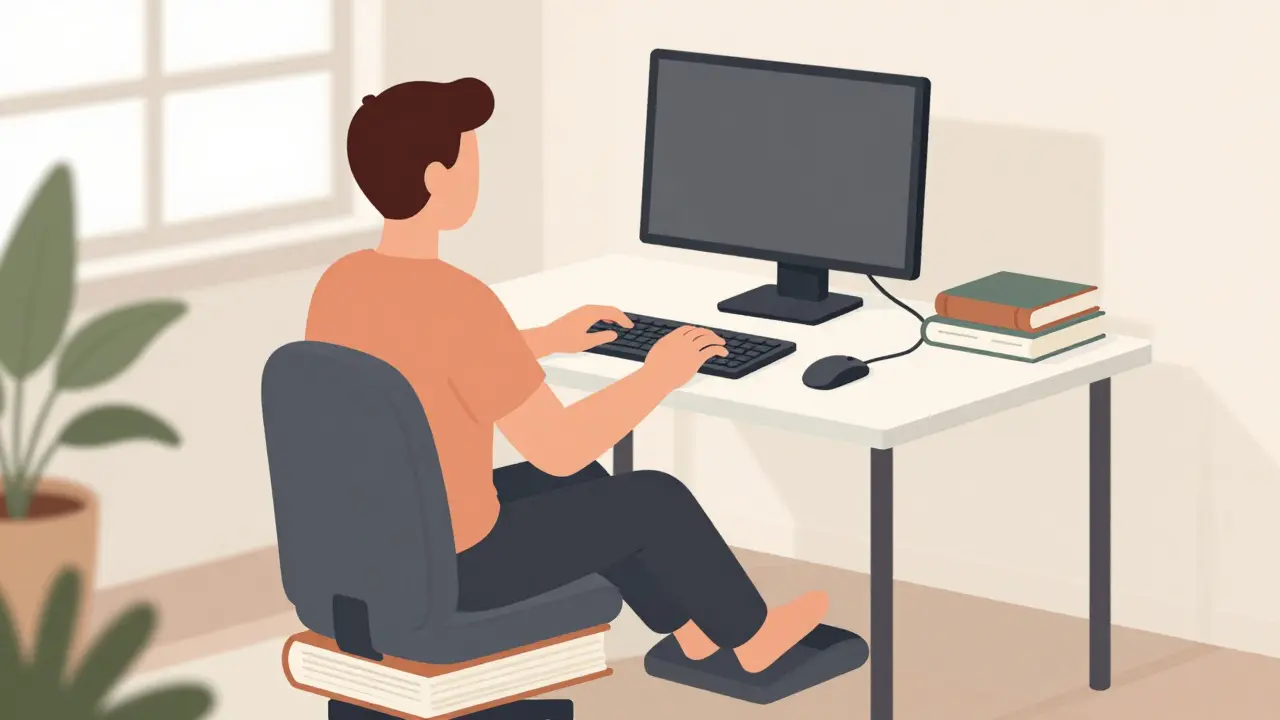
A good chair doesn’t feel soft. It feels stable. The goal? Keep your hips higher than your knees, with your feet flat on the floor. If your feet dangle, you’re putting strain on your lower back. Use a footrest if needed-don’t just live with it.
Seat height should be between 16 and 21 inches from the floor. That’s not guesswork. It’s based on the distance from your knee to the floor (called popliteal height). Too low? Your hips tilt back, flattening your spine. Too high? Your legs lose support, and pressure builds in your thighs.
Lumbar support is non-negotiable. It should fit into the natural curve of your lower back, right around the L3-L4 vertebrae. Most budget chairs ($200 or less) have fixed or flimsy lumbar support. That’s why 63% of negative reviews for cheap chairs mention "no real lower back support." Spend the extra $200. A Herman Miller Aeron or similar model with adjustable lumbar support reduces pain by 37.8%, according to the Human Factors and Ergonomics Society.
2. Your Desk: Height Matters More Than You Think
Your desk shouldn’t be a fixed 29 inches. That height works for maybe 30% of people. The rest? They’re either hunched over or leaning back awkwardly.
Elbows should rest at 90 to 110 degrees. That’s the sweet spot. If your elbows are higher than 110 degrees, your shoulders are shrugging. If they’re lower than 90, your wrists bend upward, compressing the carpal tunnel. The ideal desk height? Between 22 and 27 inches from the floor.
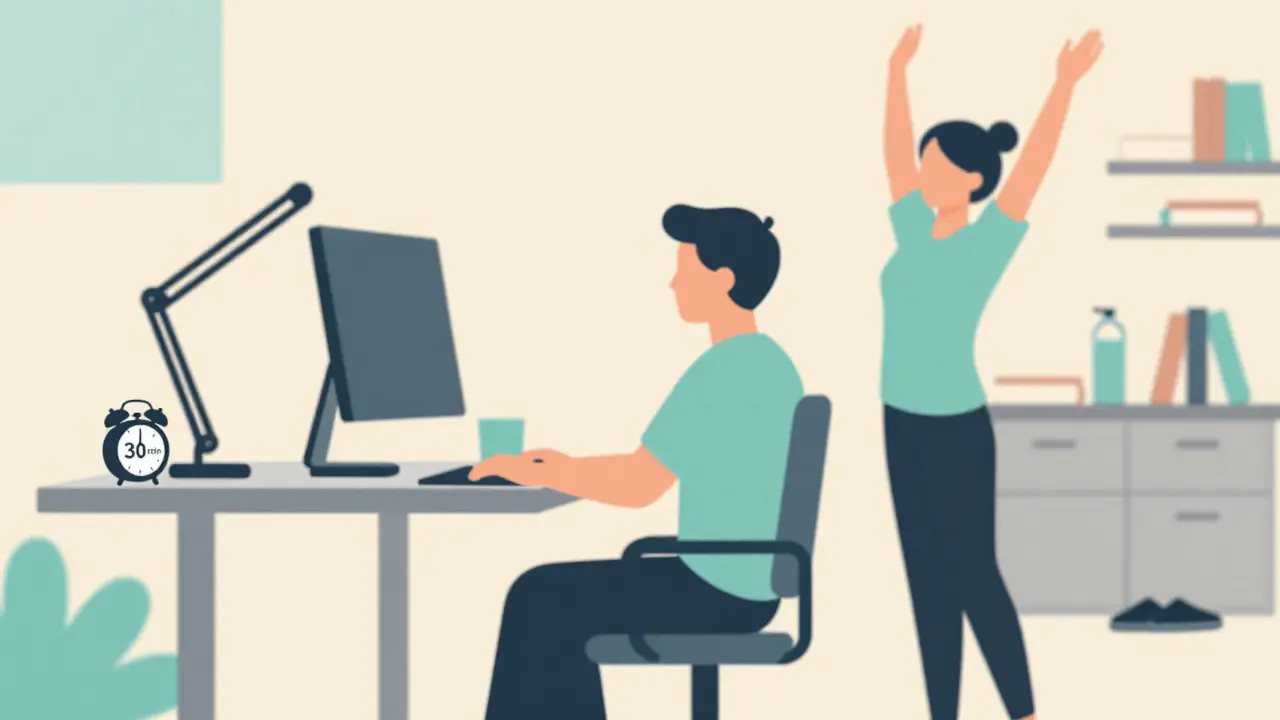
But here’s the game-changer: a sit-stand desk. A 2023 University of Michigan study found that adjustable desks reduced musculoskeletal symptoms by 32.6%-more than triple the 8.2% improvement from fixed desks. You don’t need to stand all day. Just alternate every 30 to 60 minutes. Even 5 minutes of standing every hour cuts static load on your spine.
3. Your Monitor: Eye Level Is a Myth
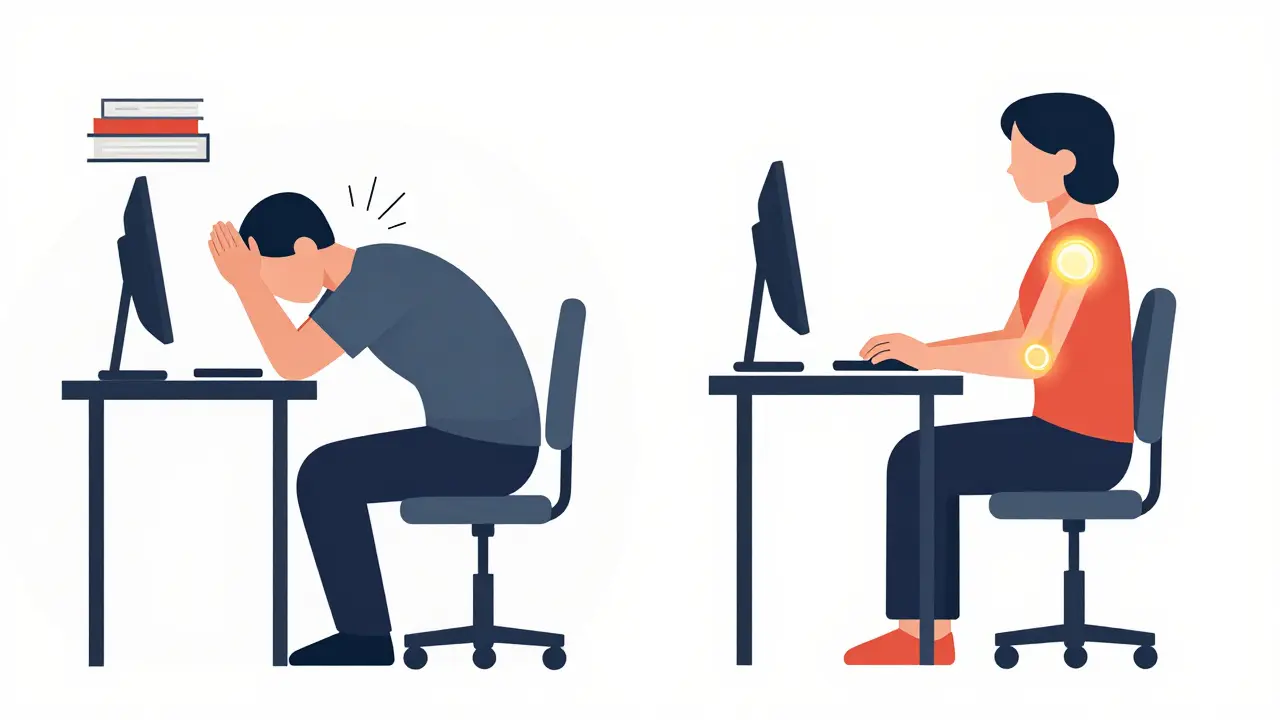
Everyone says "put your monitor at eye level." That’s wrong. Your eyes don’t look straight ahead when you’re relaxed. They look down about 15 to 20 degrees. That’s why the top of your screen should be at or slightly below eye level.
Distance? 20 to 30 inches. Too close? Your eyes strain. Too far? You lean forward, crushing your neck. Use the "fist test": hold a fist between your eyes and the top of the screen. If your fist fits, you’re good.
And don’t stack your monitor on books. That’s not a fix-it’s a bandage. Use a monitor arm. It lets you adjust height, tilt, and distance with precision. A 2023 University of Iowa study found that 67% of users misjudged monitor height-even when they thought they got it right. Monitor arms eliminate that guesswork.
And here’s a warning from the Mayo Clinic: if your monitor is more than 30 degrees above eye level, you’re loading your cervical spine 4.5 times harder than normal. That’s not just discomfort. That’s accelerated disc degeneration.
4. Your Keyboard and Mouse: Keep Your Wrists Neutral
Typing with wrists bent up or down is like holding a door open with your fingers. It’s unsustainable. The goal? Keep your wrists straight-no more than 15 degrees of extension. That’s the difference between a 43% lower risk of carpal tunnel and a 90% higher risk.
Place your keyboard so your elbows are at 90-110 degrees and your wrists stay flat. If you’re reaching, you’re doing it wrong. Your mouse should be within 1 to 3 inches of your keyboard. No stretching.
Switch to a vertical mouse. It lets your hand rest in a handshake position. A 2023 FlexiSpot survey of over 5,000 remote workers found 72% had immediate wrist pain relief. It takes 2-3 weeks to adjust, but the payoff is real.
Consider a keyboard with negative tilt-angled slightly away from you. It reduces wrist extension by 25 degrees compared to flat keyboards. Standard keyboards force your wrists into 30-45 degrees of extension. That’s not ergonomic. That’s injury waiting to happen.
What Happens When You Skip the Basics
People spend hundreds on ergonomic chairs, then leave their monitor on a stack of books. They buy a standing desk, then stand with one leg bent. They get a wrist pad, then rest their wrists on it while typing. These aren’t fixes-they’re illusions.
A Reddit thread with over 1,400 comments asked: "I bought all the ergonomic gear but still have neck pain." The answer? 89% of cases were caused by monitor height being too high. People followed "eye level" advice without realizing their eyes naturally look down. They adjusted for the wrong angle.
Another common mistake? Using a chair without lumbar support. A 2022 study found that chairs under $200 reduced pain by only 12.3%. The right chair? 37.8%. That’s a threefold difference.
And here’s the truth: 68% of remote workers use non-ergonomic furniture. That’s why they report 22% more neck and shoulder pain than office workers. Your home office isn’t a luxury. It’s your workplace. Treat it like one.
Small Changes, Big Results
You don’t need to overhaul everything at once. Start here:
- Move your monitor up until the top is at or just below eye level.
- Adjust your chair so your feet are flat and your knees are slightly lower than your hips.
- Place your keyboard so your elbows are at 90-110 degrees.
- Use a vertical mouse or a keyboard with negative tilt.
- Stand for 5 minutes every hour.
Do these five things for a week. Then check in. Do your shoulders feel lighter? Is your wrist pain less sharp? That’s your body telling you it’s working.
A 2022 Arthritis Foundation survey of 3,412 people found that 83% of consistent users saw reduced joint pain within 6 to 8 weeks. You don’t need a miracle. You need consistency.
Breaks Are Part of the System
Even perfect posture fails if you sit still for hours. Static loading-keeping the same position-is just as damaging as bad posture. The American Physical Therapy Association recommends a 30-60 second break every 30 minutes. That’s not a suggestion. It’s a medical guideline.
What should you do in those breaks? Stand up. Stretch your arms overhead. Roll your shoulders. Look away from the screen. Walk to the window. Do anything that moves your body out of its locked position. Studies show this reduces static loading on joints by 28%.
NIOSH’s 2024 update goes further: scheduled microbreaks using smart timers reduce joint strain by 31% compared to random breaks. Set an alarm. Use a free app. Whatever works. Your joints don’t care if you’re "in the zone." They care if you move.
What’s Next? The Future of Ergonomics
AI is coming. Steelcase’s new "Wellness Workspace" uses sensors to detect slouching and automatically adjusts chair and desk height. Mayo Clinic tested an AI-powered sit-stand desk in 2023 and found it reduced lower back pain 22.4% more than standard models.
By 2027, 75% of Fortune 500 companies will use AI tools to personalize ergonomic setups. But you don’t need to wait. The tools you need today are simple, affordable, and proven.
The bigger challenge? Access. Only 31% of workers who requested ergonomic accommodations got them. That’s not fair. But you can still take control. You don’t need permission to adjust your chair. You don’t need approval to move your monitor. You just need to know how.
Final Thought: Your Body Is Your Longest-Term Investment
You wouldn’t drive a car without checking the oil. Why treat your body any differently? Joint pain doesn’t come from one bad day. It comes from years of small, ignored stresses. Fixing your workstation isn’t about comfort. It’s about longevity. It’s about staying active, mobile, and pain-free for decades.
Start today. Adjust one thing. Then another. Your future self will thank you.
What’s the most important ergonomic fix for joint pain?
The most impactful fix is monitor height. Most people place their screens too high, forcing their neck into a backward tilt. This increases cervical spine loading by 4.5 times, accelerating disc wear. Moving the monitor so the top is at or just below eye level reduces neck strain immediately and prevents long-term damage.
Do I need an expensive chair to avoid back pain?
Not necessarily-but you need proper lumbar support. Budget chairs under $200 often lack adjustable lumbar support and reduce pain by only 12.3%. Chairs with adjustable lumbar padding (like the Herman Miller Aeron) reduce pain by 37.8%. The difference isn’t the price tag-it’s whether the support fits your lower back’s natural curve.
How long does it take to see results from ergonomic changes?
Many people feel relief within days-especially if they fix monitor height or wrist position. For deeper issues like lower back pain or chronic shoulder tension, consistent changes show noticeable improvement in 6 to 8 weeks. A 2022 Arthritis Foundation survey of over 3,400 people found 83% reported reduced joint pain within that timeframe.
Is standing all day better than sitting?
No. Standing for hours creates its own problems-foot pain, leg swelling, and lower back strain from leaning. The goal isn’t to eliminate sitting. It’s to alternate. Experts recommend standing for 5-15 minutes every hour. That balance reduces static loading on joints by 28% and prevents both sitting and standing injuries.
What if I work from home and can’t afford new gear?
You don’t need new gear. Use what you have. Stack books under your monitor to raise it. Use a cushion for lumbar support. Put your keyboard on a sturdy box to lower it. Put your mouse next to your keyboard. A footrest? Use a shoe or a stack of books. The key isn’t the tool-it’s the alignment. Adjust your space to fit your body, not the other way around.
Mark Harris
February 7, 2026 AT 11:55Just switched to a vertical mouse last week and my wrist pain is GONE. Like, literally vanished. Took about 10 days to get used to it but now I feel like I’m typing with my whole hand instead of just my fingers. No more numbness at night. Also started standing every hour and I swear I’m less tired by 5pm. Who knew the fix was this simple?
Marcus Jackson
February 8, 2026 AT 16:45Monitor height is the #1 mistake. People think 'eye level' means the center of the screen. No. The top of the screen should be at or just below eye level because your eyes naturally look down 15-20 degrees when relaxed. Most people put it way too high. That’s why 89% of Reddit complaints about neck pain are from monitor height. Stop guessing. Use the fist test.
Natasha Bhala
February 9, 2026 AT 22:08i just used a cushion behind my back and moved my monitor up on some books and my shoulders haven’t felt this light in years. no fancy chair needed. also standing for 5 min every hour feels like a mini vacation. my cat approves. she now sits on my keyboard when i stand up. weirdly comforting.
Ashley Hutchins
February 11, 2026 AT 04:39you’re all missing the point. if you’re still in pain after these 'fixes' then you’re probably just lazy. i’ve been using a $40 chair from walmart for 8 years. no lumbar support. no monitor arm. no standing desk. i just sit up straight. your body is not a fragile vase. stop treating it like one. also stop buying stuff. just fix your posture. it’s that simple.
Paula Sa
February 11, 2026 AT 18:21I’ve been thinking a lot about how we’ve been taught to treat our bodies like machines that can run forever with zero maintenance. We check the oil in our cars but ignore the signals from our own joints until they scream. Maybe the real ergonomic fix isn’t the chair or the monitor-it’s learning to listen. Not just when it hurts, but before. The quiet tension in your shoulders? That’s the warning. Not the sharp pain later. Small adjustments aren’t about productivity. They’re about respect.
Ritu Singh
February 12, 2026 AT 20:44In India, we often work on low tables or even the floor. But I have seen young professionals suffering from neck pain because they use laptops on beds or couches. The principles are universal: alignment matters more than equipment. A stack of books, a pillow for lumbar, and conscious movement-these are not luxuries. They are basic human needs. I encourage everyone to adapt, not to buy. Your body is your first home.
Catherine Wybourne
February 14, 2026 AT 17:16Love the part about microbreaks. I set a timer for 30 minutes and it goes off with a silly chime. I stand up, stretch like a cat who just woke up, then stare out the window like I’m waiting for a bus that’s never coming. It’s ridiculous. And it works. Also, I now have a standing desk made from a repurposed bookshelf. My landlord thinks I’m insane. I think I’m sane. 🤷♀️
Niel Amstrong Stein
February 16, 2026 AT 11:30vertical mouse changed my life 🤯 also i started doing wrist circles every 20 mins. no joke. i used to have this dull ache that never went away. now it’s just… gone. i even told my coworker and now she’s obsessed too. we have a little stand-up-and-stretch club. no one’s asked us to stop. yet. 🫶
Mary Carroll Allen
February 17, 2026 AT 18:54so i did the 5 things for a week and honestly i didnt think it would do anything but my neck pain is like 70% better?? i cry a little every time i think about how i spent 5 years hunched over a laptop on my couch like a sad ghost. also my dog now sits beside me when i stand up like she knows. i think she’s proud. i am too. 🥹
Joey Gianvincenzi
February 18, 2026 AT 09:46While the recommendations presented are empirically sound, one must acknowledge the structural inequities inherent in ergonomic access. The assumption that individuals possess the autonomy, financial means, or spatial capacity to implement these interventions is fundamentally flawed. In many domestic and occupational contexts, ergonomic optimization is not a matter of personal choice but of institutional neglect. One cannot 'just fix your posture' if your employer provides no support, your housing is overcrowded, or your income precludes even minimal adjustments. The burden of adaptation must not fall solely on the individual.